Cutroom
Cutroom is the video editor I built to cut my own Reels. It transcribes your take, removes the pauses, filler words and retakes, and adds titles, captions and animations in your brand. You leave notes on any shot in the editor, and Claude Code makes the changes. It runs on your Mac and your footage never leaves it. Fair warning: it's an early, hands-on project, not a one-click app.
Read Is It For You first. It's honest about the work involved. Still in? Check Before You Start, then follow Install and Your First Edit in order. Plan on an hour for the first run. Stuck? Go to When It Goes Sideways. Want to change how it works? Read Make It Yours.
I Built This With Claude Code. So Can You.
Cutroom started as my own problem: I hated editing my Reels. So I built the editor I wanted, with Claude Code, around a full-time job. That's the skill I want to teach.
I'm building a place where you learn to build tools like this on your own, with a CTO who's built two seven-figure software companies in your corner. And the part most tutorials skip: turning what you build into something people pay for.
Build It. Ship It. Sell It.
- Weekly CTO office hours. Live, hot-seat style. Bring the build you're stuck on.
- Live product teardowns. The stack, the landing page and the pricing, reviewed in front of everyone.
- A room of Founders. People who are building too, and cheer when you ship.
- The 30-Day Launch Plan. Validate, plan, build and launch, one week at a time. Members only.
Free to join the waitlist. Opens at $49/mo, and the price goes up as seats fill, so first in pays the least.
An Editor You Work In With Claude
Give Cutroom a video file or a YouTube link. It writes out every word you said with timestamps, cuts what a human editor would cut on a first pass, and lays the result out as a storyboard: one row per sentence, grouped into sections. You open that storyboard in your browser. Click a word to cut it, or write a note like "slam this line in" and send it to Claude. Claude edits the storyboard, renders a draft, looks at the frames to check its work, and replies on your note.
- Cuts pauses, "um" and "uh", stutters and repeated phrases.
- Spots retakes and keeps your last one.
- Drops "hey guys, welcome back" openers.
- Adds a hook title, chapter titles for lists, a callout for every number and a name card when you introduce yourself.
- Punches in on every other jump cut and crossfades between sections.
- Renders an MP4 with captions burned in, plus a
.srtfile and YouTube chapters.
Built For Tinkerers, Not A One-Click App
I want to be straight with you before you spend an evening on this. Cutroom isn't something you download and it just works. It's a plugin for a coding tool, it installs developer tools on your Mac, and it's a young project I built for my own Reels. When something breaks, you and Claude fix it. If that sounds fun, you'll like it. If it sounds like a chore, skip it. No hard feelings.
You like a little adventure.
- You already use Claude Code, or you want a real project to learn it on.
- Installing a plugin, approving tool calls and pasting a command into Terminal doesn't scare you.
- You film talking-head videos (Reels, Shorts, YouTube) often enough that a faster first cut is worth an afternoon of setup.
- When something's off, you'd rather ask Claude to fix it than wait for someone else to.
- You want to own your editor: your brand, your rules, your animations, and code you can change.
You want it to just work.
- You want a download-and-go app with a support team. Use CapCut, Descript or Final Cut instead.
- You're on Windows or Linux. Cutroom is Mac only.
- You don't have Claude Code, or never want to see a terminal.
- You need a finished video by tomorrow morning. Do a trial run on a take that doesn't matter first.
- Your videos aren't mostly you talking. Cutroom edits by speech, so music, gameplay and silent b-roll edits aren't its job.
An hour, the first time.
Installing the plugin, letting setup download about 2 GB of tools, maybe installing Homebrew in Terminal, then your first import. After that, a new video is one sentence to Claude.
Claude Code stays open.
Claude is half the editor. It has to be running and listening to pick up your notes. Its work counts toward your Claude plan's usage, like anything else you ask it.
Rough edges.
It's v0.1, built by one person for his own videos. Some things will break or look off. Most fixes are one sentence to Claude. Some are a GitHub issue or your own change to the code.
Four Things You Need
Setup installs everything else for you. These four it can't.
A Mac.
Apple silicon or Intel. Cutroom is Mac only. An M-series chip makes transcription and 4K renders a lot quicker.
Claude Code.
The terminal app, desktop app or IDE extension, on a plan that includes it. Cutroom is a plugin for it, so this is how you talk to the editor.
Homebrew.
The Mac package manager. Setup uses it to install ffmpeg, Node and uv. If you don't have it, setup stops and tells you the one command to run.
About 2 GB free.
For the tools, two headless browsers and the speech model. Then room for your videos: renders and caches add up for long 4K takes.
~/Movies/Cutroom/projects/Your edits. Each video gets a folder; finished videos are in its exports/.~/Movies/Cutroom/fonts/Your own fonts. Drop in .otf, .ttf or .woff2 files.~/Movies/Cutroom/music/ · broll/ · luts/Music, B-roll clips and .cube color looks. They show up in the editor's pickers.~/Library/Application Support/Cutroom/The tools setup installs. Plugin updates leave it alone.Four Steps In Claude Code
It's on GitHub at davidbfrogman/davecto-cutroom. You install it as a Claude Code plugin, then ask Claude to set it up.
/plugin marketplace add davidbfrogman/davecto-cutroom
/plugin install cutroom@cutroom
The first line adds my plugin list. The second installs Cutroom from it.
/reload-plugins
This starts Cutroom's tools. Type /mcp and you should see cutroom in the list.
Set up Cutroom.
Claude runs setup. It takes 5 to 10 minutes the first time, mostly downloads: ffmpeg, Node and uv from Homebrew, then the transcription tools and the browsers that draw your graphics. Approve the tool call when Claude asks.
Is Cutroom ready?
Claude calls status. If anything is still missing, it lists it and offers to run setup again. Setup is safe to repeat.
/bin/bash -c "$(curl -fsSL https://raw.githubusercontent.com/Homebrew/install/HEAD/install.sh)"
Setup stops and prints this if Homebrew is missing. Run it yourself: it asks for your Mac password, which Claude can't type for you. Then say "set up Cutroom" again.
From Raw Take To Finished Reel
Use a short talking-head take for your first run: one to three minutes, you talking to camera. That's what Cutroom is built for, and it keeps the first import quick.
Hand Claude the video.
Give it a file path or a YouTube link, and say where it's going. "Reel" or "Short" means 9:16, "YouTube" means 16:9.
Edit ~/Movies/take-3.mov with Cutroom. It's an Instagram Reel.
Wait for the import.
Cutroom makes a small preview copy, writes out every word, finds the camera cuts and plans the first storyboard. Plan on about the length of the video for 4K, less for 1080p. The very first import also downloads the speech model.
Claude replies with a link like http://127.0.0.1:4100/ui/#/p/take-3-a1b2. Open it in your browser. That address only exists on your Mac.
Read the storyboard.
Every automatic decision is visible, and you can undo any of them.
- Struck-through words are cut. Click one to bring it back, or click any word to cut it.
- Gaps like
·0.8s·are pauses that got removed. - Greyed-out shots are switched off, with a note saying why (often an earlier take).
- The preview plays the real edit, with the real titles and color.
Leave notes, then send them.
Pick a shot and write what you want under Notes for Claude. Notes without a shot are about the whole video. Write as many as you like, then press Send to Claude.
The top of the editor shows where Claude is. Claude is listening means it's waiting for your notes. Claude is working means it has them. If it says Claude not connected, tell Claude in Claude Code to wait for your notes.
Review what Claude did.
Its changes show up live and highlighted. Each one is a single undo (⌘Z). Claude replies on every note: done, or a question for you to answer in the same thread.
Keep going: more notes, send again. Claude keeps listening until you tell it you're done.
Render it.
Press Render. Quick draft (540p) is for checking. The full render is the one you post. Re-renders only redo the shots you changed.
The MP4, a .srt caption file and YouTube chapters land in the project's exports folder. Show in Finder takes you there.
Slam this line in, one phrase at a time.
Make the number in this shot invert the video behind it.
Cut the first take of the intro, keep the second.
Punch in on this line and hold it.
Add a title card before this section that says "Three mistakes".
Make the captions word by word.
Use the Film look at 60%.
Add a wipe transition into this section.
Make It Look Like You
Out of the box, Cutroom uses my look: dark plates, warm white text, one teal accent. Swap in your own colors and fonts and everything drawn into the video follows: titles, name cards, captions, title cards and the animations.
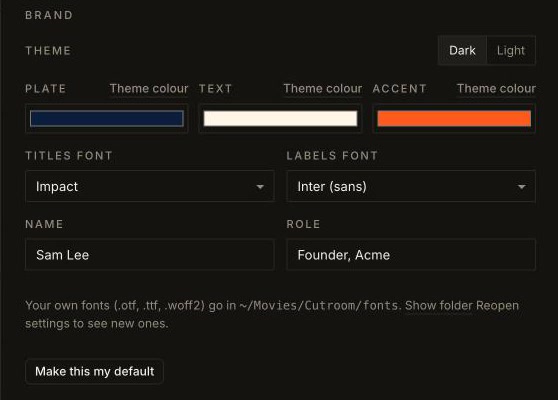
- Colors
- Plate is the band behind text, Text is the words on it, Accent is the one highlight color. Leave one blank to keep the theme's.
- Fonts
- One for titles, one for labels. Captions get their own font and size under Captions.
- Name
- Your name and role for the name card. With no name, Cutroom skips it.
- Default
- Make this my default starts every new video with these settings.
Drop font files into ~/Movies/Cutroom/fonts, then close and reopen Settings. They appear in every font menu by file name. One file per font is enough; Cutroom uses it for every weight.
Make my brand navy plates, cream text and an orange accent. Use my Advercase font for titles and captions, captions a bit bigger. My name is Sam Lee, Founder, Acme. Show me a frame, then save it as my default.
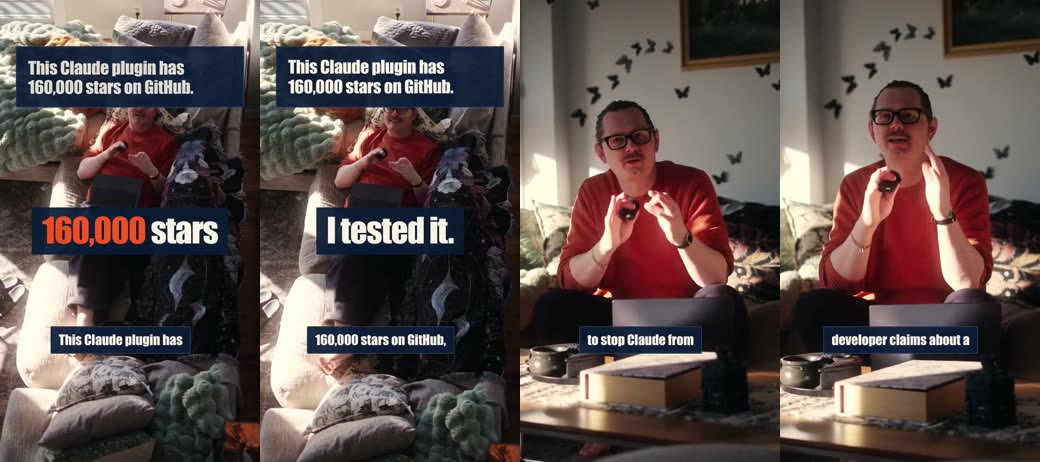
From a test install: navy, cream and orange, with Impact standing in for a customer's own font. Same brand on the title, the animation and the captions.
Ten Things That Trip People Up
Most fixes are one sentence to Claude. When something breaks, the log at ~/Movies/Cutroom/server.log usually says why, and Claude can read it for you.
Claude doesn't see any Cutroom tools.
Type /mcp. If cutroom is missing or failed, Node probably isn't installed yet, because Cutroom's tools need Node to start. Ask Claude to "run Cutroom's setup.sh with Bash", then /reload-plugins.
Setup stopped at Homebrew.
That's expected if you've never installed it. Run the Homebrew command from Install in Terminal, then ask again. On a work Mac you may need IT to allow it.
The editor says "Claude not connected".
Claude only picks up notes while it's waiting for them. In Claude Code, say "wait for my Cutroom notes". If you closed Claude Code, open it and say it again. Your notes are saved.
The editor link won't load.
Cutroom's editor starts the first time Claude uses it, and stops when your Mac restarts. Ask Claude "is Cutroom running?" and it starts it again. If another app is using port 4100, quit that app, or start Claude Code from Terminal with CUTROOM_PORT=4200 claude.
The editor looks stale after an update.
Your browser kept the old version. Hard reload the tab with ⌘⇧R.
The transcript is wrong, or not in English.
The default model is fast and English only. For other languages, or better accuracy, ask Claude to import it again with the large-v3-turbo model. It's slower and a bigger download.
A YouTube link won't download.
YouTube changes often and the downloader has to keep up. Ask Claude to run setup again: it updates yt-dlp every time. Private and members-only videos won't work.
Renders are slow.
4K 10-bit footage is heavy: a 30-second take takes about 75 seconds on an M2. Use Quick draft while you're editing, and do one full render at the end. The first animation render is slower too, while its browser warms up.
A silent part of my video got cut.
Cutroom edits by speech, so a silent demo looks like one long pause and gets cut. Raise Cut pauses longer than under Settings → Pauses, or save the demo as its own clip in ~/Movies/Cutroom/broll and lay it over the shot where you talk about it.
My change disappeared.
If you or another app edits a project file while its editor tab is open, the tab saves over it. Close the tab first, or make the change through Claude, which goes through the editor safely.
Change How It Edits
There's no AI making edit decisions inside Cutroom. The first cut comes from plain rules in code, so you can read them and change them. Two ways in: ask Claude for a new animation while you edit, or fork the repo and change the editor itself.
Animations are small web pages Claude writes for you. Ask for one in a note or in Claude Code. Say "for every video" and it goes into ~/Movies/Cutroom/motion, so you can reuse it in every edit.
Make a new Cutroom animation for every video: a big number that drops in, with a thin accent line drawing in under it. Use my brand colors, render it over shot 3 so I can see it, then use it on the 53%.
cd ~
git clone https://github.com/you/davecto-cutroom
cd davecto-cutroom
npm install
bash setup.sh
npm test
Then swap my copy for yours. Inside Claude Code: /plugin marketplace remove cutroom, then /plugin marketplace add followed by your folder's full path, then /plugin install cutroom@cutroom. While you work, run npm run dev in Terminal: the editor restarts every time you save a file, and Claude uses it.
Where To Change What
shared/plan.mjsgraphics/overlay.js · overlay.cssmotion/<name>/index.htmllib/luts.mjs, or drop a .cube in ~/Movies/Cutroom/lutsshared/brand.mjsui/mcp.mjs · skills/cutroom/SKILL.mdlib/render.mjsStart with the CLAUDE.md.
The repo has one written for exactly this. Open Claude Code in your copy and say "read CLAUDE.md, then your change". It knows the rules below.
Fix the rule, then add a test.
If Cutroom keeps cutting a word you want, the fix belongs in shared/plan.mjs, with a test in tests/ that fails before your change and passes after. Run npm test.
Check it by looking.
Tests can't tell you a title looks off. Render a quick draft and look at frames. Ask Claude to "render a draft and show me frames at 2s and 8s".
Send it back.
Built something good? Open a pull request on the repo. A new animation or a sharper cutting rule helps everyone who edits with it.
Tools Are The Easy Part.
Anybody can build software now. Not everybody can build a business.
Reading about tools is a great way to feel busy. The Lab is for Founders who'd rather get customers: weekly office hours with a CTO who's built two seven-figure software companies, and a room of other Founders who care whether anybody buys what you're making.
Less Theater. More Customers.
Want my 30-Day Launch Plan? It's for Lab members only: validate, plan, build and launch, one week at a time.
See The Solo Founder Lab ▶